Relancer un devis en attente
L'outil Relancez de devis rédige pour vous le message de relance à envoyer après un devis resté sans réponse, ni mou ni insistant. Il s'agit bien du message texte : le devis chiffré, lui, se crée dans l'outil Devis. Vous le trouvez dans votre Espace client, via Dashboard, puis Assistant métier.
À noter. L'Assistant métier est inclus dans votre abonnement. Chaque génération consomme 1 du quota mensuel de votre plan.
Ouvrir l'Assistant métier et sélectionner votre métier
Rendez-vous dans votre Espace client, via Dashboard, puis Assistant métier. Avant tout, sélectionnez votre métier dans la liste et cliquez sur Enregistrer. C'est ce qui permet à l'agent d'écrire avec le vocabulaire et le ton de votre secteur.
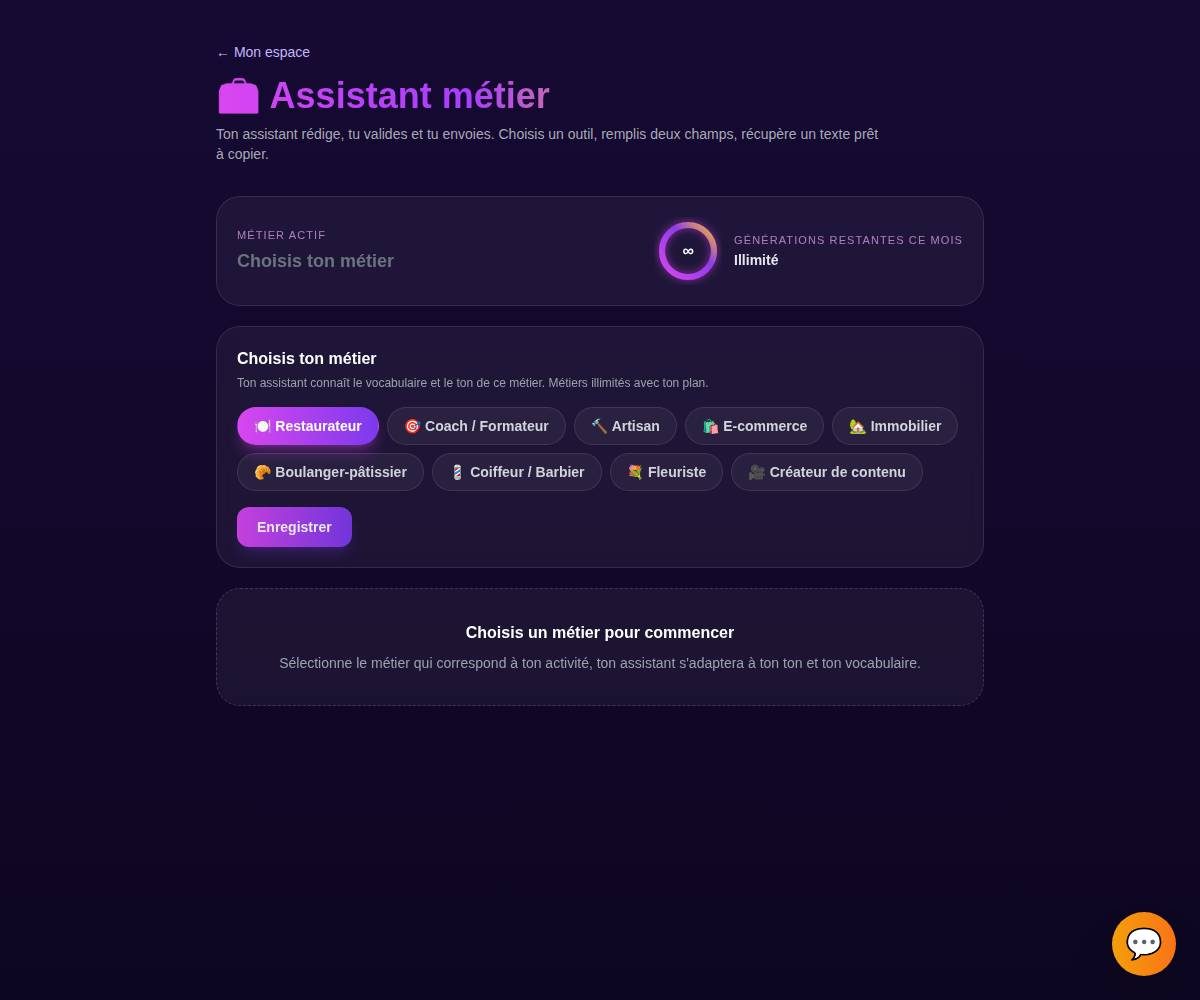
Tip. Le compteur de quota en haut vous montre combien de générations il vous reste ce mois-ci. Chaque génération en consomme une, quel que soit l'outil.
Choisir l'onglet « Relance de devis »
Dans l'Assistant métier, ouvre l'onglet Relance de devis. Chaque onglet correspond à un outil de rédaction dédié.
Préciser le devis, le client et le délai
Indiquez à l'agent de quel devis il s'agit (le client, la prestation) et depuis combien de temps il est en attente. Vous pouvez ajouter un détail utile, comme un rendez-vous prévu ou une échéance qui approche.
Ce que vous précisez
Devis rénovation pour M. Martin, envoyé il y a 10 jours, sans réponse.
La relance proposée
« Bonjour M. Martin, je reviens vers vous au sujet du devis de rénovation envoyé le 3. Une question ou un ajustement à prévoir ? Je reste dispo pour en parler. »
Tip. Donnez le délai écoulé (« envoyé il y a 10 jours ») : c'est ce qui permet à l'agent de doser le ton, entre le simple rappel et la relance plus ferme.
Générer les variantes
Cliquez sur Générer. L'agent vous propose plusieurs variantes en quelques secondes, pour que vous choisissiez celle qui vous ressemble le plus.
Tip. Pas convaincu par une variante ? Ce n'est qu'un point de départ, vous allez pouvoir l'ajuster à l'étape suivante.
Copier, régénérer ou ajuster le ton
Une fois la bonne variante repérée, vous pouvez :
- Copier le texte en un clic.
- Régénérer pour de nouvelles propositions.
- Ajuster le ton : plus court, plus chaleureux, plus direct.
Il ne vous reste plus qu'à utiliser le texte, en le collant dans votre email ou votre SMS au client.
Tip. Vous gardez toujours le dernier mot. Rien n'est envoyé ni publié automatiquement, l'agent vous prépare le texte, c'est vous qui décidez quand et où l'utiliser.
Exemples par métier
Un usage court et crédible de l'outil, quel que soit votre métier.
« Relancer un devis traiteur envoyé il y a une semaine »
« Relancer un prospect après une proposition de programme »
« Relancer un devis de rénovation sans réponse »
« Relancer une commande B2B en attente de validation »
« Relancer un mandat de gestion proposé le mois dernier »
« Relancer un devis buffet entreprise resté sans suite »
« Relancer une prestation mariage devisée en début de mois »
« Relancer un devis décoration florale d'évènement »
« Relancer un devis d'identité visuelle en attente »
Tips bonus
Relance au bon moment
Trop tôt, vous pressez ; trop tard, le projet est froid. Précisez le délai écoulé à l'agent, il ajuste le message pour qu'il tombe juste selon l'ancienneté du devis.
Rappelle la valeur, pas juste le prix
Une bonne relance redonne envie plutôt que de réclamer une réponse. Ajustez le ton pour remettre en avant ce que le client y gagne, sans insister sur le montant.
Laisse une porte ouverte
Termine sur une question simple (un doute à lever, un ajustement possible). C'est ce qui déclenche la réponse, bien plus qu'un « avez-vous reçu mon devis ? ».
Enchaîne avec l'outil Devis
La relance concerne un devis chiffré que vous avez créé dans l'outil Devis. Ici, l'Assistant rédige le message ; le devis lui-même reste géré dans le module Devis (inclus dans votre abonnement).
Prêt à relancer vos devis sans y penser ?
L'Assistant métier est inclus dans votre abonnement. Découvre les packs pensés pour votre métier, ou lance votre essai.