Créer et envoyer un devis pro
L'outil Devis vous permet de créer un vrai devis chiffré, de générer un PDF pro, de l'envoyer par email à votre client et de suivre son statut, sans quitter votre espace. Vous le trouvez dans votre Espace client, via Dashboard, puis Devis (Facturation).
À noter. Les devis sont inclus dans votre abonnement.
Renseignez vos paramètres de facturation
À faire une seule fois. Renseignez votre raison sociale, votre nom, votre adresse, votre email et votre SIRET (14 chiffres). Choisissez ensuite votre Régime de TVA.
- Franchise en base : la mention « TVA non applicable, art. 293 B du CGI » s'ajoute automatiquement, aucune TVA n'est calculée.
- Assujetti : vous définissez votre taux de TVA.
Cliquez sur Enregistrer.
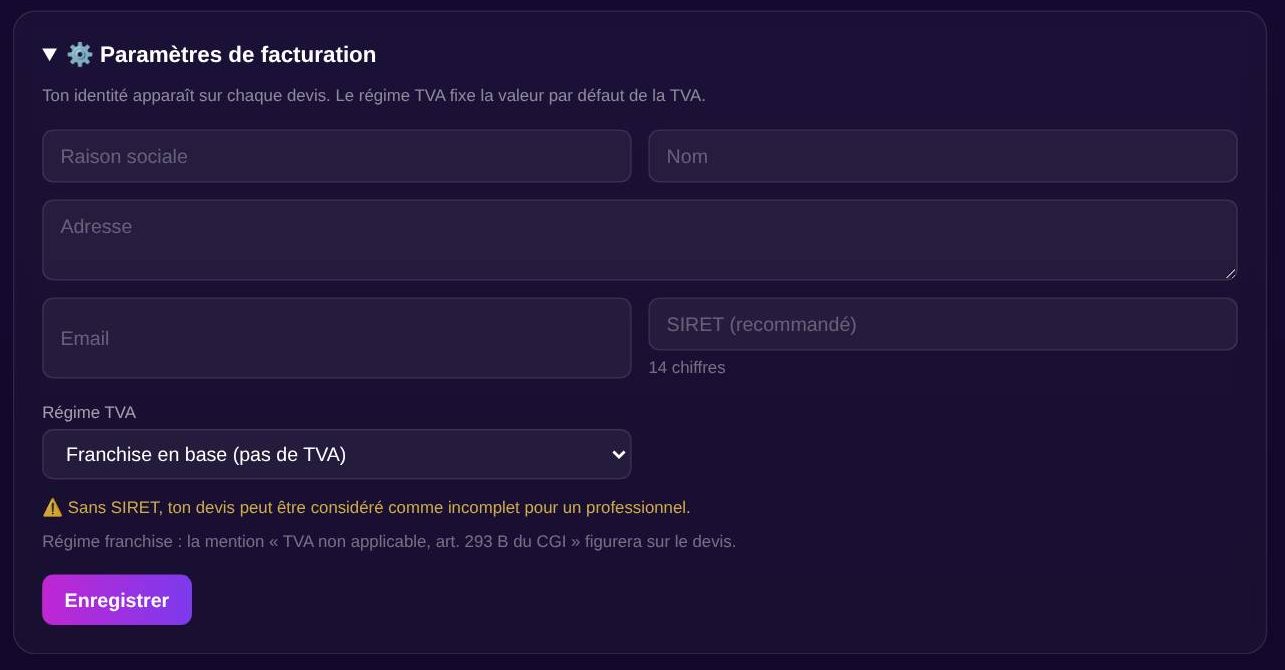
Tip. Sans ces informations, votre identité (l'émetteur) n'apparaît pas en haut du devis. Remplissez-les avant de créer votre premier devis.
Créer un devis
Cliquez sur + Nouveau devis. Remplissez les informations du client (nom, email, adresse), puis ajoute vos lignes.
- Désignation (obligatoire), Quantité, Prix unitaire HT.
- + Ajoutez une ligne pour d'autres prestations.
- Cochez Appliquer la TVA sur ce devis si besoin (le choix se fait par devis).
- Règle la Validité (en jours) et les Notes / conditions.
Le Total HT, la TVA et le TTC se calculent automatiquement. Cliquez sur Créer le devis.
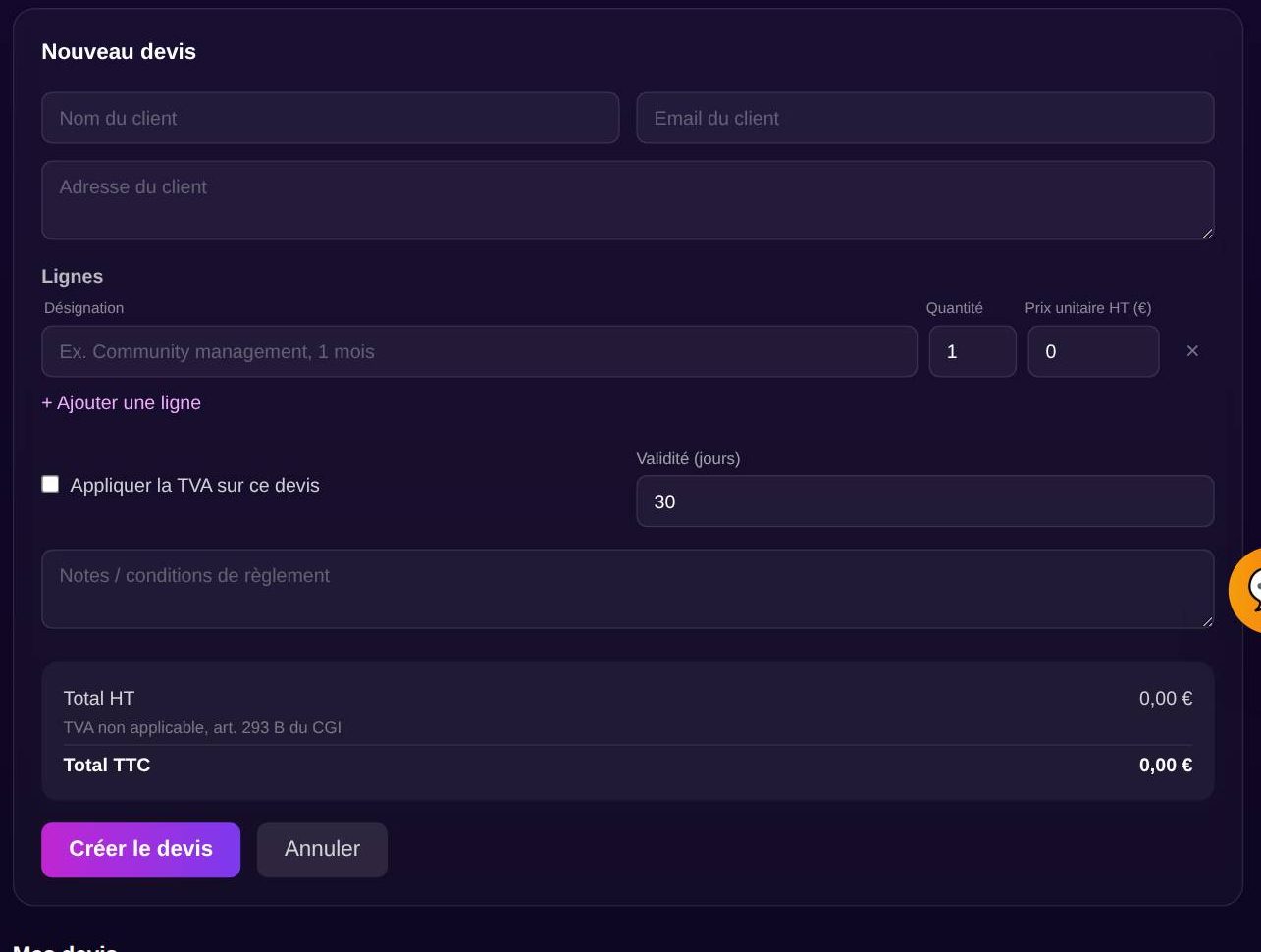
Tip. Mettez TOUJOURS une désignation sur chaque ligne. Sans désignation, la ligne est ignorée et le total reste à 0.
Téléchargez le PDF
Dans la liste Mes devis, clique sur ⬇ PDF. Le document pro contient votre bloc ÉMETTEUR, le DESTINATAIRE, les lignes, les totaux et les mentions légales (« Bon pour accord », durée de validité, mention TVA).
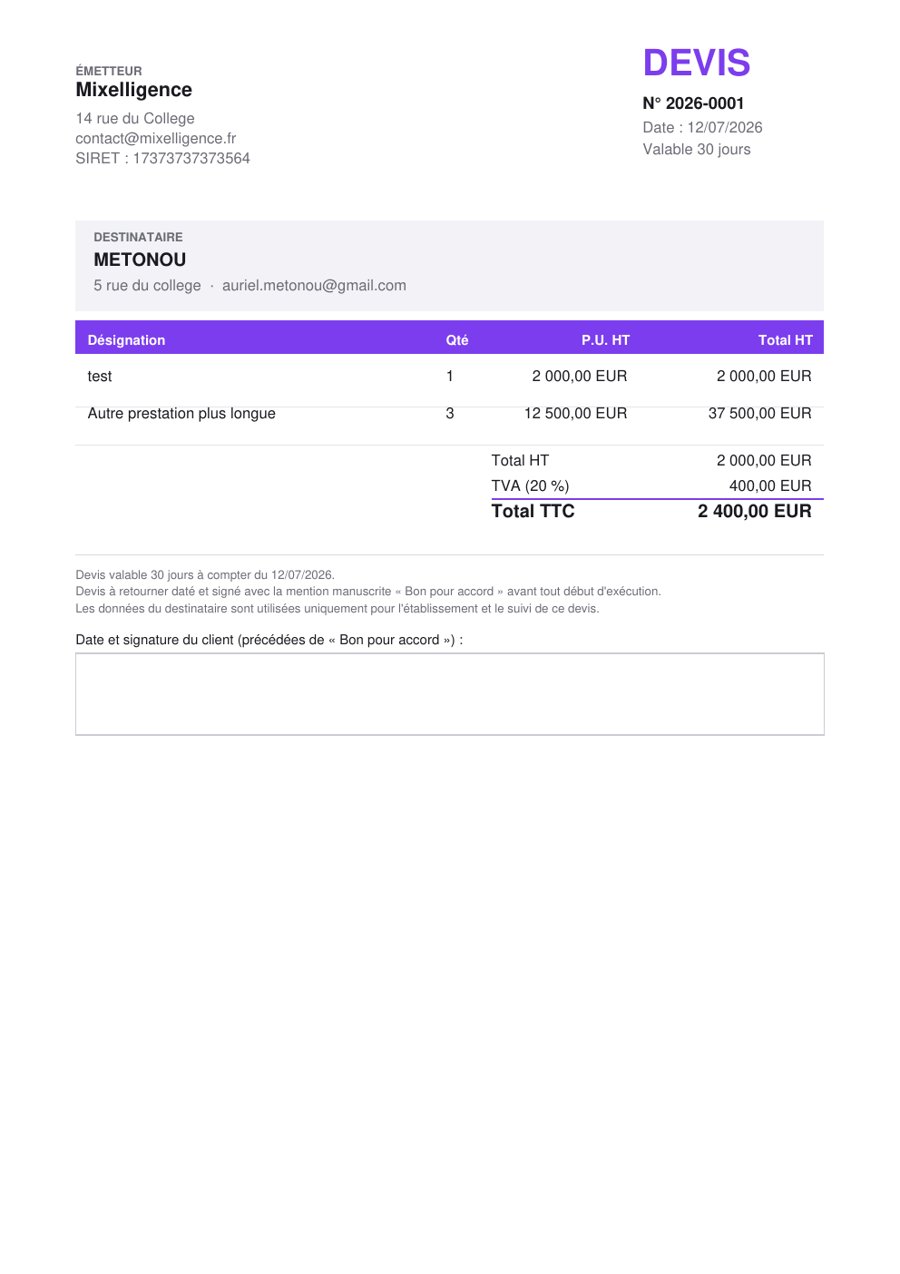
Tip. Le PDF est toujours régénéré à jour, il n'y a pas de cache. Vous obtenez la version exacte de votre devis à chaque téléchargement.
Envoyer le devis par email au client
Cliquez sur ✉ Envoyer au client. L'email part au client avec le PDF joint, et un message de confirmation Envoyé ✓ s'affiche. Le statut du devis passe automatiquement à Envoyé.
Tip. Vérifiez que l'email du client est bien rempli et valide avant d'envoyer, c'est l'adresse qui recevra le devis.
Suivre le statut du devis
Chaque devis a un menu de statut. Vous le changez à la main via le menu déroulant coloré à côté du devis, pour savoir en un coup d'œil où en est chacun.
- Brouillonen préparation, pas encore transmis
- Envoyétransmis au client, en attente de réponse
- Acceptéle client a validé le devis
- Refuséle client ne donne pas suite
Tip. Passez un devis en « Accepté » dès que le client valide, vous gardez une vue claire de ce qui est signé et de ce qui reste à relancer.
Modifier ou supprimer
Cliquez sur Éditer pour reprendre un devis existant, ou sur Supprimer pour en effacer un seul. Pour un ménage plus rapide, coche plusieurs devis puis clique sur Supprimer la sélection pour en supprimer plusieurs d'un coup.
Exemples par métier
Une idée de ligne de devis crédible, quel que soit votre métier.
« Menu traiteur, 30 couverts (entrée, plat, dessert) »
« Programme coaching, 3 mois (2 séances / semaine) »
« Rénovation salle de bain (fourniture + pose) »
« Pack de 50 coffrets cadeaux personnalisés »
« Mandat de gestion locative, honoraires annuels »
« Buffet petit-déjeuner entreprise, 40 personnes »
« Prestation mariage à domicile (mariée + 3 invitées) »
« Décoration florale événement (cérémonie + salle) »
« Identité visuelle complète (logo + charte) »
Tips bonus
Numérotation automatique
Chaque devis reçoit un numéro unique au format AAAA-NNNN, remis à zéro chaque année. Vous n'avez rien à gérer, la suite est propre et sans doublon.
Franchise ou assujetti
En franchise en base, la mention « TVA non applicable, art. 293 B du CGI » s'ajoute toute seule et aucune TVA n'est calculée. En assujetti, vous définissez votre taux et la TVA apparaît sur le devis.
Relancer sans y penser
Un devis reste « Envoyé » sans réponse ? Utilisez l'outil « Relancez de devis » de votre Assistant métier pour rédiger un message de relance juste, ni mou ni insistant.
Garde vos infos à jour
Si votre adresse, votre SIRET ou votre régime de TVA changent, mettez à jour vos paramètres de facturation. Tous vos prochains devis reprennent automatiquement les bonnes infos.
Prêt à créer votre premier devis ?
Les devis sont inclus dans l'abonnement. Découvre les packs pensés pour votre métier, ou lance votre essai.